Administration and Customization > The Options Window
Open View > Options and select the Database tab. Each setting is described below using the label shown in the window.
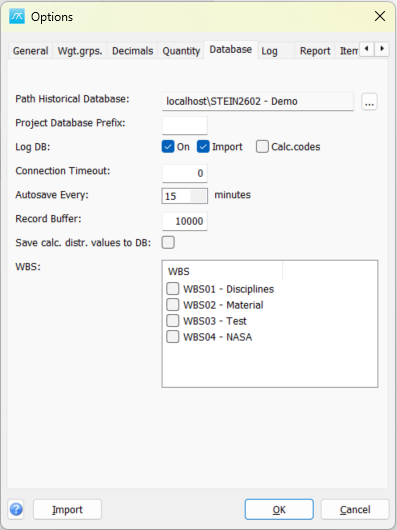
Path Historical Database: Select the historical database used for reference-project data and historical exports. The browse button opens a selector for its database server and database.
Project Database Prefix: Set the prefix used for project database names. This identifies the project database naming scheme; changing it does not rename existing databases.
Path database folder: Set the database folder location shown in the dialog, for example a shared network database folder.
Log DB - On: Enable database change logging.
Log DB - Import: Include imported data changes in database logging.
Log DB - Calc.codes: Include calculated-code changes in database logging.
Connection Timeout: Set the timeout used when establishing a database connection.
Autosave Every: Set the interval, in minutes, between automatic saves.
Record Buffer: Set the record buffer size used when reading item data.
Save calc. distr. values to DB: Store calculated weight-distribution values in the database.
WBS: Select which additional work-breakdown structures should be available in the main window.
Click OK in Options to save pending values, or Cancel to close without saving pending Options edits. Separately opened setup windows can save their own changes.