Parameter References
Use Parameter References to inspect where a parameter is used by estimation methods and reference projects. This is useful before changing or deactivating a parameter definition.
Open the window
Open Database > Administrator > Parameter Definition... and select the required parameter. Right-click and choose Show Methods used... or Show Reference Projects used... .
Both commands open the Parameter References window, which lists the available method and reference-project references for the selected parameter. The window title identifies the parameter being inspected.
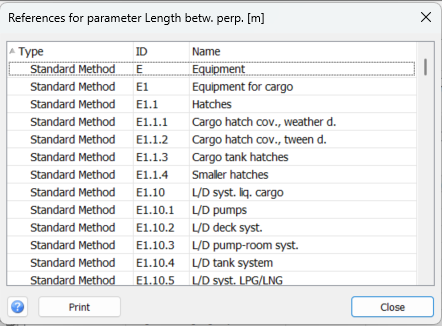
Read the reference list
The table contains three columns:
Type: The reference category: Standard Method, Main Parameter Method, User Defined Method or Reference Project.
ID: The weight-group ID for a method reference, or the project ID for a reference project.
Name: The corresponding weight-group or reference-project name.
A method reference indicates that the parameter is used in that weight group’s estimation method. A reference-project entry indicates that the historical project contains a value for the parameter.
The list is for inspection. It does not change parameter values, method definitions or reference-project data.
Understand the scope
This window shows the method and reference-project references collected by Parameter Definition. It is not a complete search for every occurrence of the parameter in cell formulas or other expressions.
Before changing a parameter, consider its meaning, unit and use in the listed methods and historical data. A change can affect the comparability of values used in estimation. The program prevents deactivating parameters that have registered method or reference-project references.
Print and close
Click Print to open a print preview of the reference list.
Click Close to return to Parameter Definition.