Use Generate Default Coefficient to calculate default estimation coefficients from selected historical reference projects. The results are saved in the default coefficient data for the chosen estimation method, value type and project types. This operation updates reusable coefficients; it does not estimate or change the current project's item weights.
Open the window
Choose Database > Coefficients > Generate.... The command requires an open project and system-administrator access.
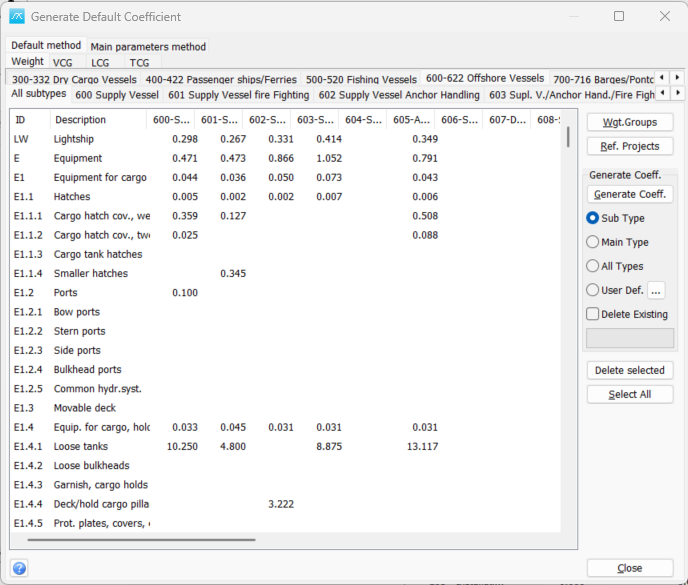
Select what to calculate
Use the method tabs to choose Default method or Main parameters method. Use the value tabs to select Weight or the relevant centre-of-gravity coordinate. The coordinate labels follow the project setup.
Choose the main project-type tab and the required subtype. The main-type overview lets you work with its listed subtypes; selecting a particular subtype restricts the target to that subtype.
Select the weight-group rows to update. Use Wgt.Groups to select groups through the hierarchy, or Select All to select all listed groups. Work in batches of no more than 1,000 selected rows.
Select reference projects and type rules
Click Ref. Projects to choose the historical projects available to the calculation. Under Generate Coeff., select the project-type rule: Sub Type uses projects of the matching subtype; Main Type uses projects within the matching main type; and All Types permits reference projects of any type. User Def. uses a custom project-type selection configured with the ... button. The type rule and reference-project selection work together.
The reference data must contain suitable values for the weight group and parameters required by its estimation method. A selected project does not necessarily contribute a valid coefficient to every calculation.
Generate coefficients
Click Generate Coeff. to calculate and store coefficients for the selected rows and target types. The calculation uses the average of the usable reference-project coefficients. The progress bar shows the calculation progress.
Existing coefficients with usable reference data are updated. Delete Existing has a more specific meaning: when selected, it also removes an existing coefficient for a processed combination if no usable reference data is found. Leave it cleared when those existing values should be retained.
Generation writes the coefficient data during the operation. Close closes the window; it does not undo generated values.
Review or remove values
With a specific subtype selected, double-click a weight-group row to open the coefficient editor. Review the generated values before using them as defaults in estimation. The existing Default Coefficient Library chapter describes how default coefficients are used in the estimation graph.
Delete selected is the separate command for deleting coefficient records associated with selected weight-group rows and the displayed target-type selection. It is different from Delete Existing, which is applied as part of generation.
For the Wgt.Groups hierarchy-selection window and its inclusion rules, see 4.4.1 Select Weight Groups