Utilization of the Log Database
Use Log Database Cleanup to remove retained log records for projects that no longer exist in the corresponding project database. Open Project > Delete > Delete Unused Log Databases... The command is available to a system administrator.
Although the menu refers to deleting log databases, the operation deletes project-specific records from tables in the log database. It does not drop the database itself or delete current project items.
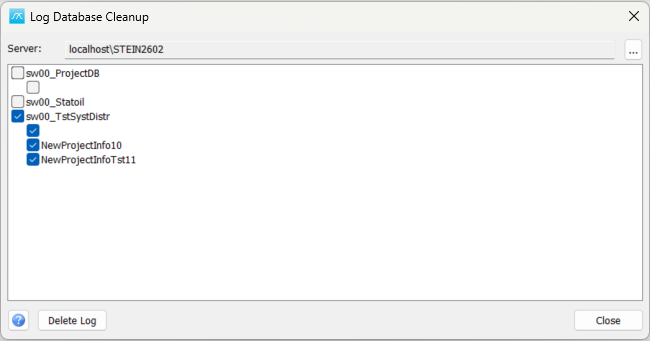
Choose the server and projects
Server / ...: Shows the SQL Server being inspected. Click ... to select a server and refresh the project tree. Verify the server before selecting log data for cleanup.
Project tree: The tree groups candidate projects beneath their corresponding database. The program compares project IDs found in the log database with those in the project database and lists IDs that exist only in the log database. A candidate is therefore a project whose retained log history remains after the project itself has been removed.
Tick the project entries whose log history you intend to remove. Highlighting a row alone does not select it for deletion. A database-level checkbox can change the selection of its child projects; review the individual project checkboxes before proceeding.
Both the project database and its associated log database must be available on the selected server for the comparison. If either database cannot be opened, resolve the reported connection problem before deciding which history is no longer required. The tree is not a general list of every database or every log record.
Delete or close
Delete Log: After confirmation, delete the selected project IDs from log tables that contain a ProjectID field. The VERSION table is excluded. This removes retained history for those projects; it does not remove a date range or a filter-selected subset of their history.
Check that the selected history is no longer needed and that a suitable database backup exists before confirming. The window has no undo action for deleted log records. Review any reported SQL errors; a failed operation should not be assumed to have removed all selected history.
Close: Close the window. Closing without choosing Delete Log does not perform cleanup.
Help: Open this topic. F1 opens the same page.
For the log database structure and use, see 5.7.4 Utilization of the Log Database.