Use Text Parameter to select a predefined text value for a project parameter. Open the value selector for a text parameter from the parameter view or parameter-value dialog. The choices come from the definition of that text parameter.
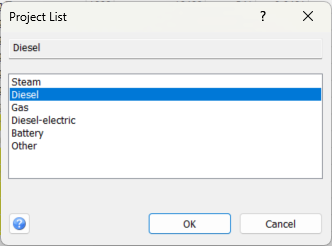
Select a value
Selected value: The read-only field at the top shows the current or selected value. Choose an alternative from the list to update this field; free text cannot be typed directly into it.
Alternatives: Select the required entry from the list. In the normal Text Parameter mode, the first blank entry clears the value. The remaining entries are the defined alternatives, not an automatically generated list of all text used elsewhere in the project.
Check that the selected-value field shows the intended choice before accepting. Double-clicking an entry selects and accepts it in one action.
Accept or cancel
OK: Accept the selected alternative and return to the calling parameter view. In normal Text Parameter mode the value is assigned to that parameter. Any additional project saving follows the workflow of the window that opened the selector.
Cancel: Close without accepting the newly selected alternative.
Help: Open this topic. F1 opens the same page.
Available alternatives and permissions
If the required alternative is not listed, review the text-parameter definition rather than entering a new alternative in this window. The selector chooses existing alternatives; it does not edit their definitions.
When project-edit permission is unavailable, the selection controls may be disabled. The permission checks also depend on how the calling window uses the selector.
Other selection modes
The same dialog is reused for project lists, code types and code values. Its caption and list contents change accordingly, for example Project List or Select Code Type. In these modes, OK returns the selection to the calling command; it does not necessarily edit a project parameter.
Some code-selection workflows have two steps: first select the code type, then select a code value. OK or a double-click advances to the next step when required. Read the current window caption and selected-value field before accepting.
For entering project parameters, see 2.3 Enter Parameter Values.