Administration and Customization > The Options Window
Open View > Options and select the Codes tab. Each setting is described below using the label shown in the window.
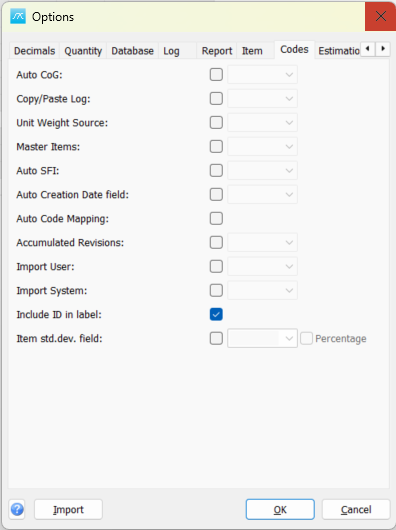
Auto CoG: Enable automatic item CoG and extent values from the selected code type. The selected code's coordinate limits provide the source data.
Copy/Paste Log: Enable copy/paste tracking in the Items window and select the code field used to record it.
Unit Weight Source: Enable automatic item unit weight from the selected code type's UnitWeight data.
Master Items: Enable master-item handling and select the code type used to identify master items.
Auto SFI: Automatically populate the selected code type with the default SFI code associated with the item's weight group.
Auto Creation Date field: Select the code field used for automatic creation-date recording. The application populates the configured field when creating items and in supported update operations.
Auto Code Mapping: Apply configured mappings between codes automatically when code values are assigned or changed by supported operations.
Accumulated Revisions: Enable accumulated-revision handling and select the code type used for revision identification.
Import User: Select the code field used to record the user associated with imported data.
Import System: Select the code field used to record the source system associated with imported data.
Include ID in label: Include the code ID in code labels.
Item std.dev. field: Enable item standard-deviation values and select their code field.
Percentage: Interpret the selected item standard-deviation field as a percentage of item weight rather than an absolute weight value.
Click OK in Options to save pending values, or Cancel to close without saving pending Options edits. Separately opened setup windows can save their own changes.