Administration and Customization > The Options Window
Open View > Options and select the Decimals tab. Each setting is described below using the label shown in the window.
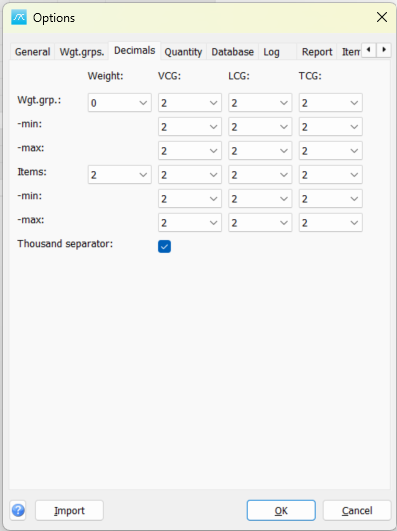
Wgt.grp.: Set the displayed number of decimals for weight and the three CoG coordinates in the main window.
Wgt.grp. -min: Set the displayed decimals for the lower extent limits of weight groups.
Wgt.grp. -max: Set the displayed decimals for the upper extent limits of weight groups.
Items: Set the displayed number of decimals for item weight and the three CoG coordinates in the Items window.
Items -min: Set the displayed decimals for lower item extent limits.
Items -max: Set the displayed decimals for upper item extent limits.
Thousand separator: Use a space to group thousands in displayed numbers. Decimal settings control presentation and do not round the stored source values.
Click OK in Options to save pending values, or Cancel to close without saving pending Options edits. Separately opened setup windows can save their own changes.