Administration and Customization > The Options Window
Open View > Options and select the General tab. Each setting is described below using the label shown in the window.
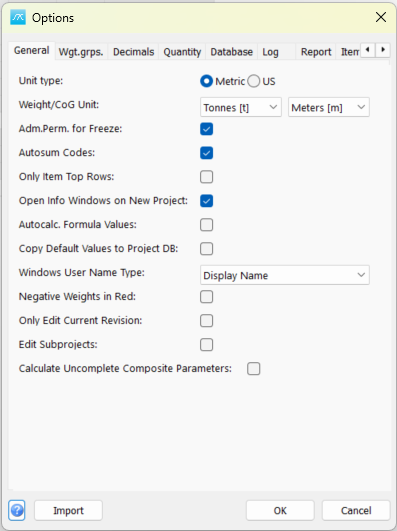
Unit type: Select Metric or US units for the project. Check the displayed units when entering or interpreting values.
Weight unit: Select the unit used to display weight-group weights.
CoG unit: Select the length unit used to display weight-group coordinates and extent limits.
Adm.Perm. for Freeze: Require administrator privileges for the Freeze wgt.grp. over command in the Estimate menu.
Autosum Codes: Automatically update custom-code weight summaries in the main window when relevant data changes.
Autocalc. Formula Values: Automatically calculate values defined by formulas instead of relying only on manual recalculation.
Copy Default Values to Project DB: Copy default parameter values into the project's parameter data.
Only Item Top Rows: Read only the configured item top rows for the main-window item view. The top-row value is set under Item > Top Row Default.
Open Info Windows on New Project: Open the project information/parameter window when creating a new project.
Windows User Name Type: Choose the form of the Windows user name used when registering item changes.
Negative Weights in Red: Display negative weight values in red to make them easier to identify.
Only Edit Current Revision: Restrict editing to the current revision rather than allowing edits to earlier revisions.
Edit Subprojects: Allow editing of subproject values from the master-project context, subject to the user's other access rights.
Calculate Uncomplete Composite Parameters: Allow composite parameters to be calculated even when not all component parameter values are defined. Review incomplete inputs when interpreting the result.
Click OK in Options to save pending values, or Cancel to close without saving pending Options edits. Separately opened setup windows can save their own changes.