The Deadweight vs. Displacement Graph shows displacement and available deadweight at the drafts defined in the project's hydrostatic data. Open Load Conditions, click Hydrostatics, then click DW graph.
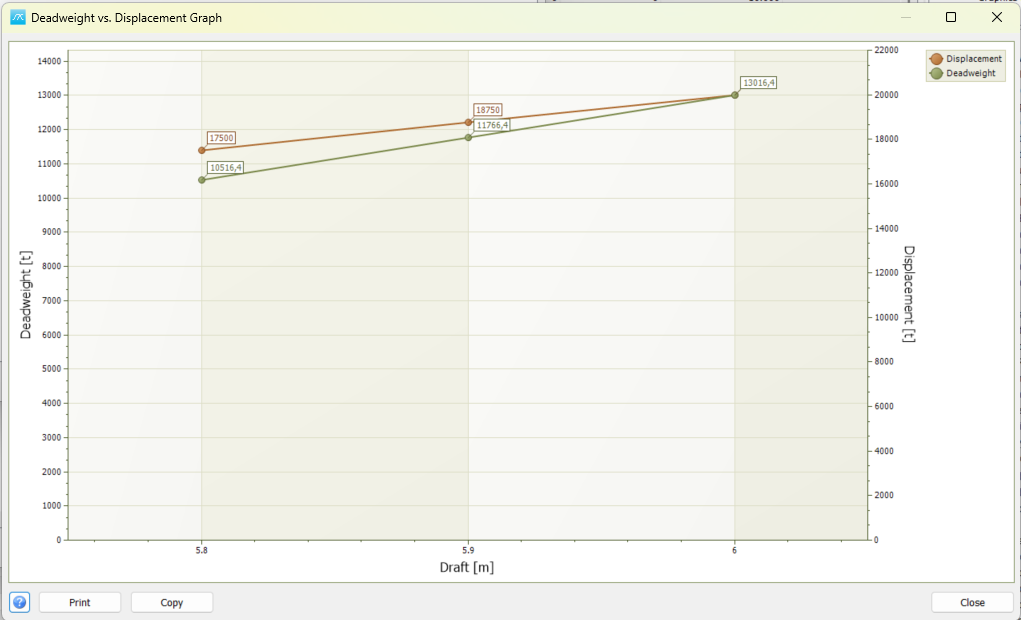
Displacement and available deadweight at different drafts, based on the current lightship weight.
Data and calculation
Displacement is read from the Displacement column of the project's Hydrostatics table. A point is plotted for each row, ordered by Draft. Lines connect the points in draft order.
Deadweight is calculated at each draft as:
Deadweight = Displacement - Lightship weight
The lightship weight is taken from weight group LW in the current project. The same lightship weight is used for every point. The graph therefore shows the deadweight available at each draft; it does not sum the loads in a selected load condition.
For example, if displacement at a particular draft is 10,000 t and lightship weight is 7,000 t, the available deadweight at that draft is 3,000 t. Deadweight covers the loads carried in addition to lightship, such as cargo, fuel, ballast, stores and persons.
Read the graph
The horizontal axis shows Draft. The left vertical axis shows Deadweight, and the right vertical axis shows Displacement. Use the axis corresponding to the series you are reading; the two vertical axes can have different scales.
The legend identifies the Displacement and Deadweight lines. Point labels show the plotted values, and pointing at a data point provides its draft and weight as a tooltip. Length and weight units follow the project's unit setting.
Because the two series use separate vertical axes, their visual separation is not a direct measure of lightship weight. Compare the numerical values at the same draft instead.
Prepare the data
Check that Hydrostatics contains the required Draft and Displacement values for the current project. An empty hydrostatic table gives no plotted points. Use a suitable range of drafts and enough points to describe the displacement curve.
Check the current lightship weight in group LW before using the deadweight figures. A change in lightship weight shifts all calculated deadweight values, while the displacement data remain unchanged. Close and reopen DW graph after changing the source data to rebuild the graph.
A negative deadweight value means that the hydrostatic displacement at that draft is less than the current lightship weight. Check the draft, displacement, units and LW value when a result is unexpected.
Buttons
Print: Opens the graph report in Print Preview for output. Printing requires permission to output weight information.
Copy: Copies an image of the graph to the clipboard for pasting into a report or another application.
Close or Cancel: Closes the graph window. This window displays calculated results; it does not edit the hydrostatic data or lightship weight.
Related documentation
See Loading Conditions and Hydrostatics for the load-condition window and the hydrostatic data used by this graph.