The Item window: Entering Weight Information
Create Margin Items
Use Create Margin Items to create weight items representing a specified weight margin or moment correction. The window calculates the proposed items from the values you enter.
This function creates actual items in the project. It is separate from defining and monitoring margins in the Margins window.
Open the window
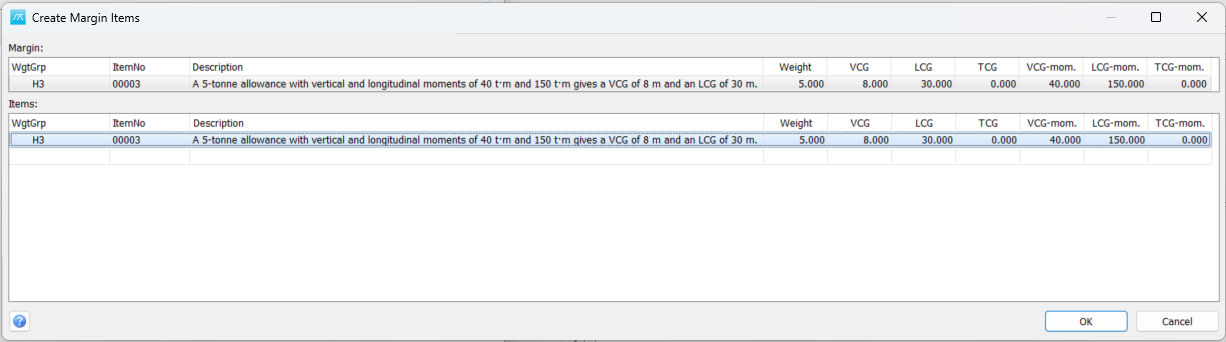
In the Items window, choose Items > Create Margin Items... . The upper Margin table contains the requested correction. The lower Items table previews the items to be created.
Specify the margin
Enter the destination WgtGrp, an unused ItemNo and a meaningful Description. Additional identification fields may appear depending on the project’s item-key configuration.
Enter the required Weight and centre-of-gravity coordinates. The coordinate headings follow the project’s naming conventions, such as VCG, LCG and TCG.
The moment columns represent weight multiplied by the corresponding centre-of-gravity coordinate. Changing the weight or a coordinate updates the moments. For a non-zero weight, entering a moment recalculates its corresponding coordinate.
Finish editing each cell to update the preview.
Review the proposed items
For a non-zero margin weight, the window proposes one item with the specified weight and centre of gravity.
For a zero-weight moment correction, the window can propose two items with equal and opposite weights. Their combined weight is zero, allowing a moment correction without increasing the total weight. Item numbers are based on the entered number with suffixes _01 and _02.
Review the proposed weights, coordinates and identification fields in the lower table before accepting. For a moment correction, check that the resulting combined moments represent the intended adjustment.
Create or cancel
Click OK to create the proposed items. The destination weight group and item identifiers must be valid, and the identifiers must not already exist.
Click Cancel to close without creating the proposed items.
After creation, review the items in the Items window and check their contribution to the weight-group totals. Creating the items does not replace the existing project items.