Administration and Customization > The Options Window
Open View > Options and select the Hydrostatic tab. Each setting is described below using the label shown in the window.
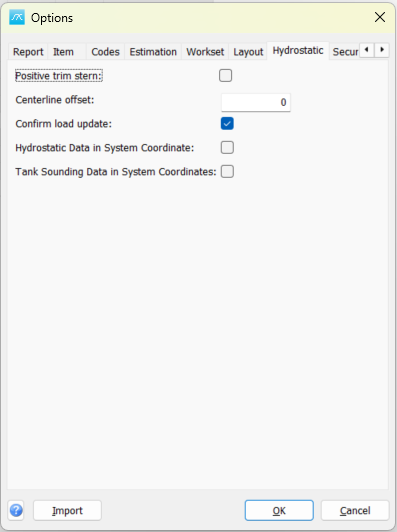
Positive trim stern: Use positive trim for stern-down trim. When cleared, the program uses the opposite sign convention.
Centerline offset: Set the centerline offset used by the hydrostatic calculations, in the displayed coordinate unit.
Confirm load update: Ask for confirmation when updating loads in the hydrostatic/load-condition workflow.
Hydrostatic Data in System Coordinate: Treat hydrostatic data as expressed in the system coordinate convention.
Tank Sounding Data in System Coordinates: Treat tank sounding data as expressed in the system coordinate convention. Match this selection to the coordinate system used by the source data.
Click OK in Options to save pending values, or Cancel to close without saving pending Options edits. Separately opened setup windows can save their own changes.