Administration and Customization > The Options Window
Open View > Options and select the Layout tab. Each setting is described below using the label shown in the window.
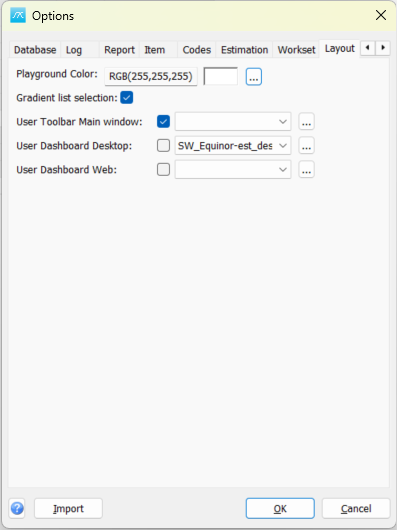
Playground Color: Choose the background color for the playground area. The displayed color code and preview show the selected color.
Gradient list selection: Use a gradient when highlighting selected list rows.
User Toolbar Main window: Enable a user-defined main-window toolbar/menu setup and choose its setup ID. The adjacent browse button opens Menu Setup.
User Dashboard Desktop: Enable a user-defined dashboard for the desktop application and select its setup ID. The adjacent browse button opens Dashboard Setup.
User Dashboard Web: Enable a user-defined dashboard for the web application and select its setup ID. This selection is separate from the desktop dashboard.
Click OK in Options to save pending values, or Cancel to close without saving pending Options edits. Separately opened setup windows can save their own changes.